Authorize uninvoice.app to report on your behalf
Before uninvoice.app can send your invoice records to the AEAT under Veri*Factu, you have to authorize us to do it for you. It is a one-time step you complete yourself with your electronic certificate.
The standard way is to sign an authorization document. uninvoice.app is a social collaborator of the AEAT, so you authorize us by signing the tax agency's own form with your certificate, without leaving uninvoice.app. There is nothing for you to do at the tax agency, and it takes effect as soon as the signed document checks out. If you would rather register a power of attorney at the AEAT yourself, that alternative is equally valid in law and stays available.
This page compares the two, walks through each one, and explains what happens inside uninvoice.app while your authorization is on its way.
The standard way and the alternative
| Sign an authorization document (standard) | Grant a power at the tax agency (alternative) | |
|---|---|---|
| What it is | The AEAT's standard authorization form under colaboración social (social collaboration), signed by you and kept by us | A power of attorney (apoderamiento) registered at the AEAT in favour of our tax id |
| Where you do it | In uninvoice.app, signing the document on your own computer | On the AEAT's own site |
| What you need | Your electronic certificate and AutoFirma | Your electronic certificate or Cl@ve |
| When it takes effect | As soon as the signed document checks out | Once our daily check with the AEAT confirms it, usually by the next day |
| Changing or ending it | Write to us and we do it for you | Revoke the power at the AEAT; write to us to change route |
Signing an authorization document is possible because uninvoice.app is a social collaborator of the AEAT (a colaborador social under a Tipo 017 agreement). Under that agreement you authorize us directly, with the tax agency's own form signed with your certificate, and nothing has to be registered at the AEAT: we keep the signed document and produce it only if the tax agency asks for it. It is how we work with our customers: every step happens in uninvoice.app, you have no procedure of your own to complete at the tax agency, and there is no wait for it to confirm anything.
Granting a power is the alternative, and the route most tax advisers know: the power lives in the AEAT's registry, you can review or revoke it there at any time, and the AEAT validates it whenever we submit a record for you. Pick it if you would rather keep the authorization in the AEAT's own registry.
Either way, until you have authorized us, uninvoice.app cannot issue Spanish invoices for you. See Until you authorize us below.
When you are asked for this
Choosing how you authorize us is part of registering your company, because a Spanish issuer cannot send anything to the tax agency until this is done. Right after your company details, registration asks How would you like to authorize us? with Sign an authorization document already selected and marked Recommended. Continue with it, or pick Grant a power at the tax agency instead. Your company is registered with that choice.
The route you choose stays with your company. The power and the signed document are two different legal mechanisms, so you do not switch between them yourself. If you ever need to change route, or to end an authorization, write to us and we will do it for you.
Granting it can wait. Registration is finished once your company details and your choice are in, and the whole app opens: customers and suppliers, expenses, proformas, templates, bank accounts, reports, the API and agent access. Only issuing Spanish invoices waits. The steps after your choice offer I'll do it later, the banner above your invoices and proformas leads back to them, and signing in brings you back while your authorization is still to be completed.
If your company is not established in Spain, none of this is shown. Registration is the single company-details step it has always been.
Who needs to do this
Only issuers established in Spain need this authorization.
If you are not a Spanish taxpayer in scope, neither route applies to you, and the app will say so on the authorization page.
You must also be a taxpayer who reports under Veri*Factu (not SII).
The standard way: sign an authorization document
uninvoice.app is a social collaborator of the AEAT (colaborador social, under a Tipo 017 agreement between the tax agency and Curried Software S.L.U.). Spanish law lets a taxpayer authorize a social collaborator directly, by signing the tax agency's standard authorization form (Anexo I of the Resolución of 18 December 2024) instead of registering a power at the AEAT.
The form names you as the taxpayer granting the authorization (Otorgante) and us as the representative accepting it (Representante). It is not filed anywhere: we keep it, and produce it only if the tax agency asks for it. That is why we check it so carefully when it comes back, as described below.
Keep Sign an authorization document selected when registration asks how you want to authorize us, then follow these steps.
1. Tell us who will sign
The form, Who will sign the authorization?, asks only what your registration cannot answer. Your company's name and tax id come from the details you already registered and are not editable here: the document has to name the taxpayer whose invoices we will be sending.
- A sole trader (autónomo) authorizes us in their own name, so the form asks only for your name exactly as it appears on your certificate, and lets you correct the address the document prints.
- A company is authorized by the person who signs for it, so the form asks for that person's full name, their personal tax id and their fiscal address.
The tax id on the form must be the one in the certificate you sign with. If they differ we cannot accept the document, and the app will say so.
When the details are right, press Prepare the document.
2. Download the document and sign it on your own computer
We fill in the tax agency's own form, sign our half of it and give it to you to download. The document already carries our signature: the form has two signature boxes, Otorgante and Representante, and the one that says we accept the representation you are granting is signed before the file reaches you.
Preparing it takes a moment, so the page tells you when it is ready. You can close it and come back: the document waits for you.
Sign it with your electronic certificate using AutoFirma, the tool the AEAT itself points at, and choose the PAdES format it produces by default. AutoFirma adds your signature beside ours on a document that is already signed, which is what it does by default with any signed PDF: open the file you downloaded and sign it as it is. Do not convert it, print it, or save it out of another program first. A tool that rebuilds the file instead of adding to it removes our signature, and we cannot accept a document that has lost it.
Which certificate depends on who is authorizing:
- A sole trader (autónomo) signs with their personal certificate.
- A company signs with its representative certificate (certificado de representante de persona jurídica). A personal certificate is refused here, because it does not say that the person signing may act for the company.
Do not change anything in the document. Not the name, not the tax id, not the date. We check that what comes back is byte for byte the document we prepared, and an edited one is refused. This is deliberate: it is what stops a signature standing over a document that says something other than what we generated.
3. Upload the signed file
Upload it in the same step. We check it before storing anything, and a document that does not check out is refused rather than kept. The reasons you might see:
| What the app says | What to do |
|---|---|
| That is not the document we prepared | Download it again and sign it without editing it. |
| It still carries only our signature | You uploaded the file as we gave it to you. Sign it with your certificate first. |
| Your signing tool rebuilt the file | It replaced the document instead of adding to it, so our signature is gone. Sign the downloaded file again, choosing the option that adds a signature to a PDF that is already signed. |
| That file does not carry our signature | Download the document again from the app and sign that exact file. |
| Our own signature no longer checks out | The document changed after we prepared it. Download it again and sign it as it is. |
| That file carries no signature | Sign it with AutoFirma before uploading. |
| We cannot read that signature | Sign with AutoFirma, which produces the expected format. |
| The signature does not cover the whole document | Sign the downloaded file again, unchanged. |
| The signature does not check out | The file was modified after signing. Start again from the download. |
| The certificate belongs to a different tax id | Sign with the certificate of the person named on the form, or change the details and prepare a new document. |
| That is a personal certificate | You are signing for a company, so you need its representative certificate. |
| We do not recognise who issued your certificate | Sign with a qualified certificate from a Spanish trust-service provider, and make sure AutoFirma includes the full certificate chain. |
| Your certificate has expired | Renew it and sign the document again. |
4. That is usually it
Part of what we check is your certificate itself: not just that the signature is sound, but that the certificate behind it was issued by a certification authority we recognise. That is the whole point of signing with a qualified certificate rather than any file that can produce a signature.
When it checks out, the authorization takes effect straight away and you can issue Spanish invoices. If it does not, the upload is refused on the spot with the reason, and nothing is stored: you are not left waiting on something that was never going to work.
There is one case where you do wait. If we are not yet set up to check certificates automatically, the authorization reads pending while a person checks yours, exactly as an apoderamiento waits for the tax agency's check. The app says so on the page, and we email you when it takes effect.
Changing or ending it
This authorization is not ended or changed from the app. Write to [email protected] from an account of the company and we will do it for you: we withdraw the authorization, and if you are moving to the power at the tax agency, we set that route up for you to grant. The signed document is kept afterwards: it is evidence we may be required to produce, so what is recorded is that the authorization ended, not that it never existed. Withdrawing blocks Spanish invoicing again until the new authorization is in place.
The alternative: grant a power at the tax agency
You register an AEAT power of attorney (apoderamiento) in favour of the software producer's NIF:
- The power is registered at the AEAT, granted by you in favour of the software producer's NIF.
- You can grant, review, and revoke it yourself at any time from the AEAT.
- The AEAT validates that power whenever we submit a record for you, so its registry is always the authoritative source.
Who receives the power
The power is granted in favour of the software producer's NIF, not to a person. For uninvoice.app that is:
| Producer | Curried Software S.L.U. |
| NIF | B75929299 |
Use this NIF as the apoderado (representative) when you register the power at the AEAT.
Granting the power, step by step
1. Confirm that this applies to you
You are a Spanish taxpayer required to report under Veri*Factu (not SII). If in doubt, check with your tax adviser.
2. Grant the power at the AEAT
You do this once, on the AEAT's own site, signed with your electronic certificate or Cl@ve. It takes a few minutes. Because you sign it in the AEAT registry, the grant is registered with the tax agency: a checkbox inside a web app cannot replace this step.
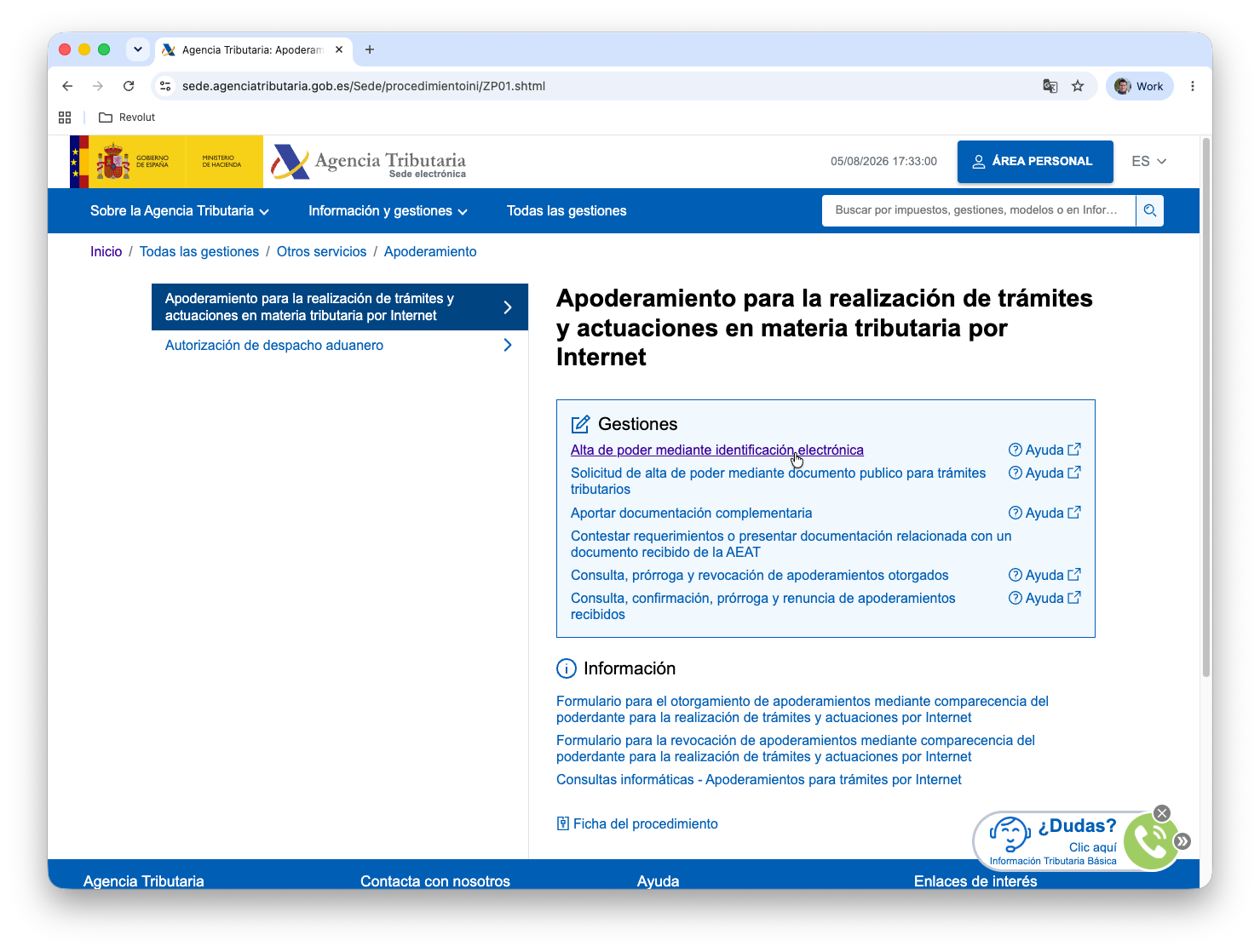
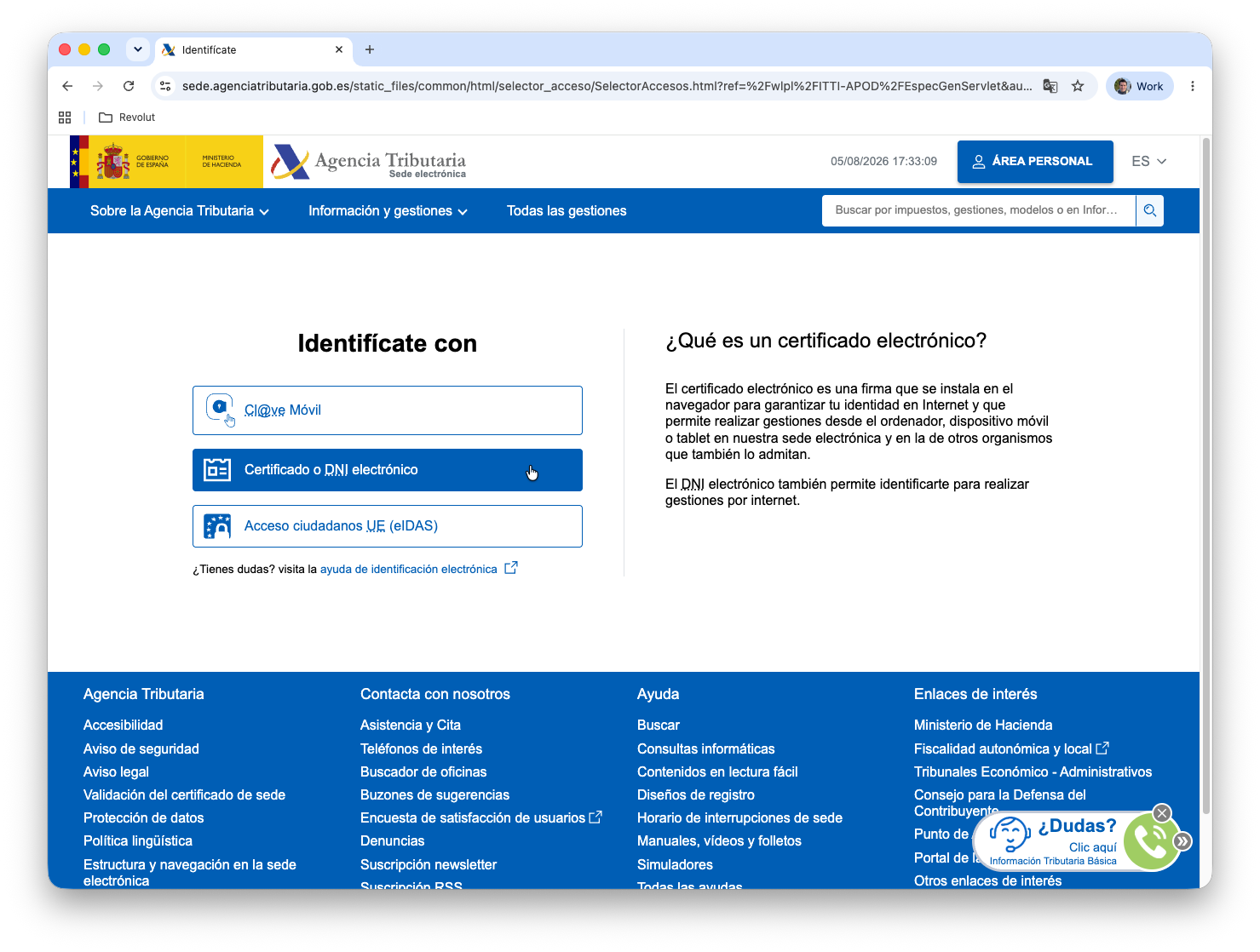
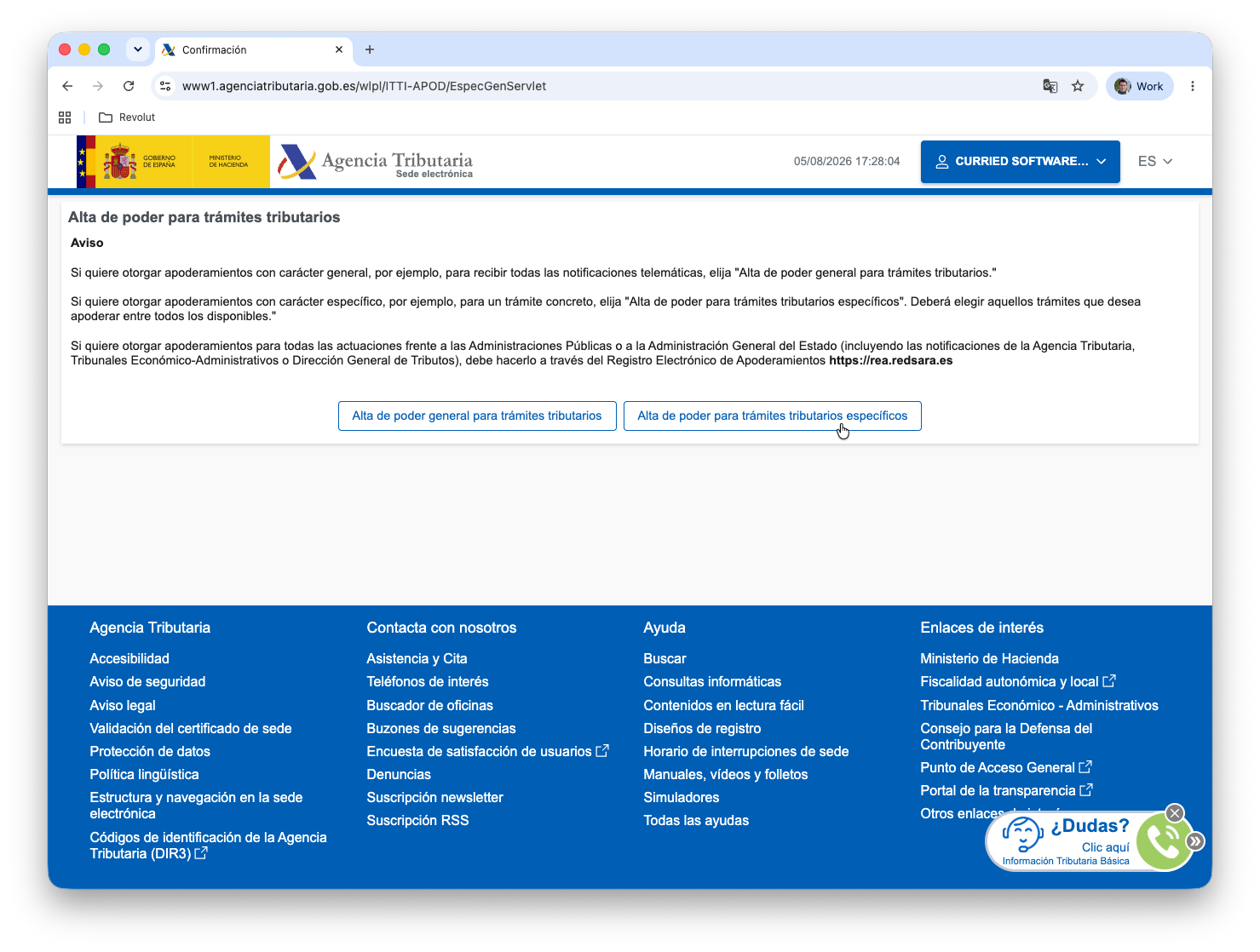
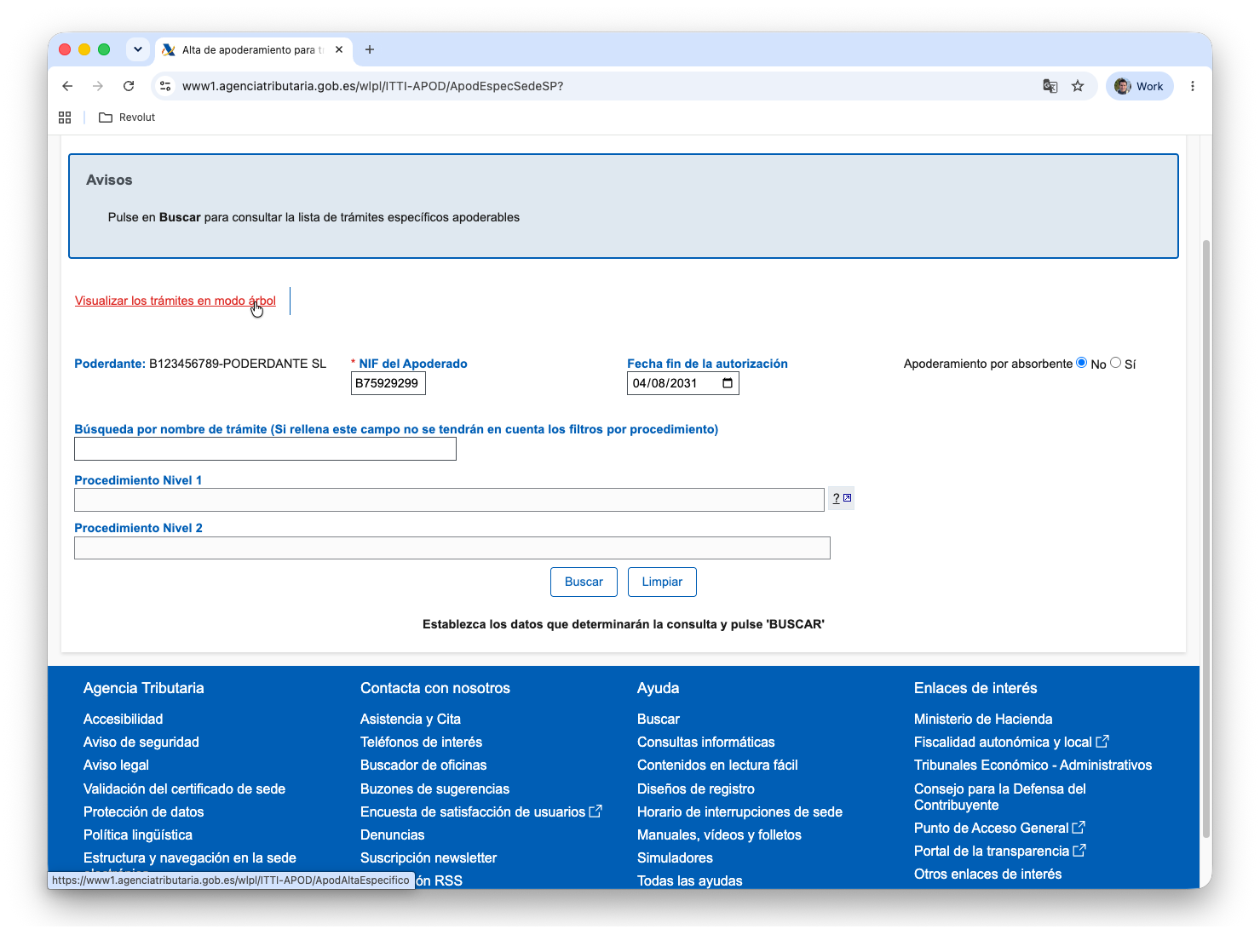
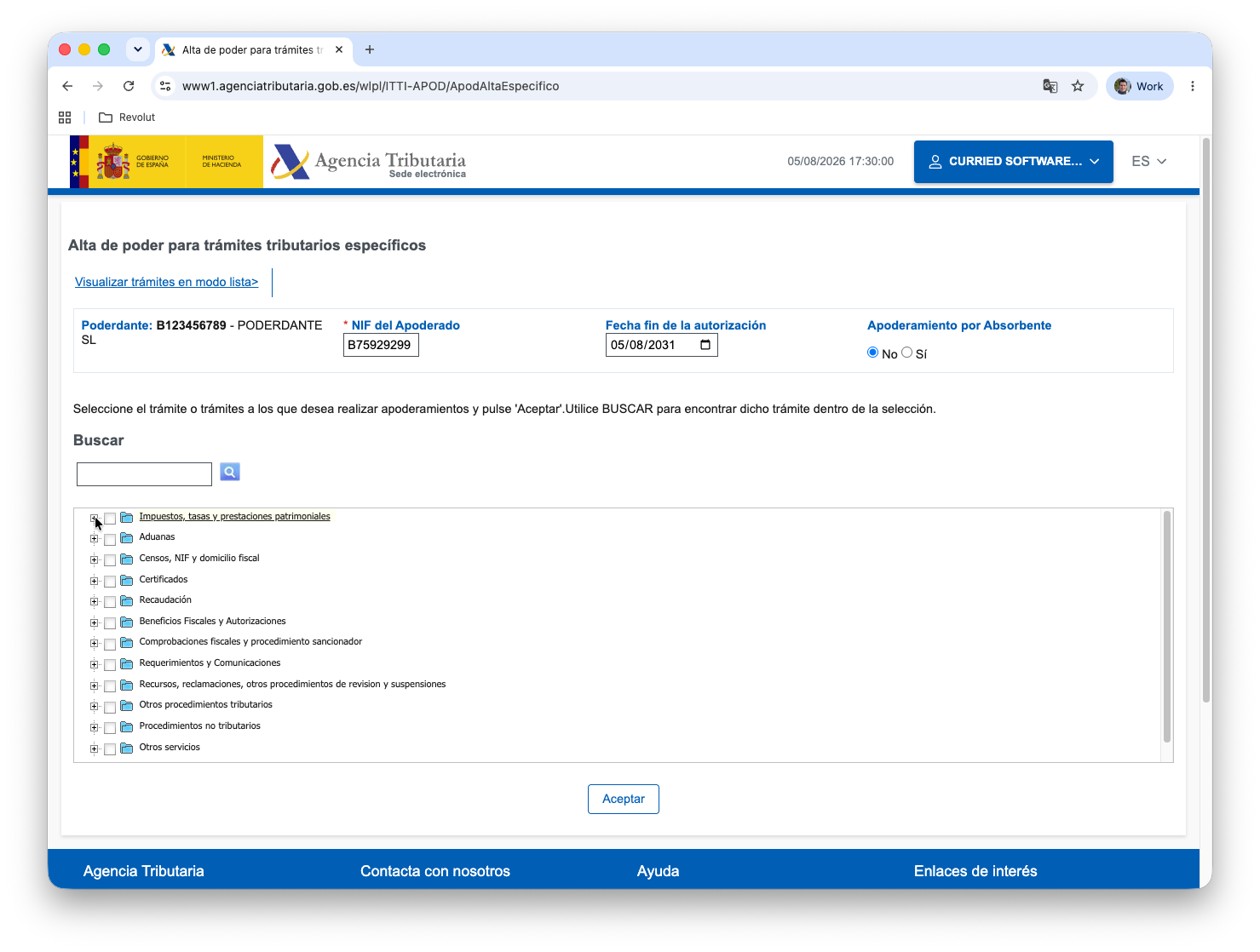
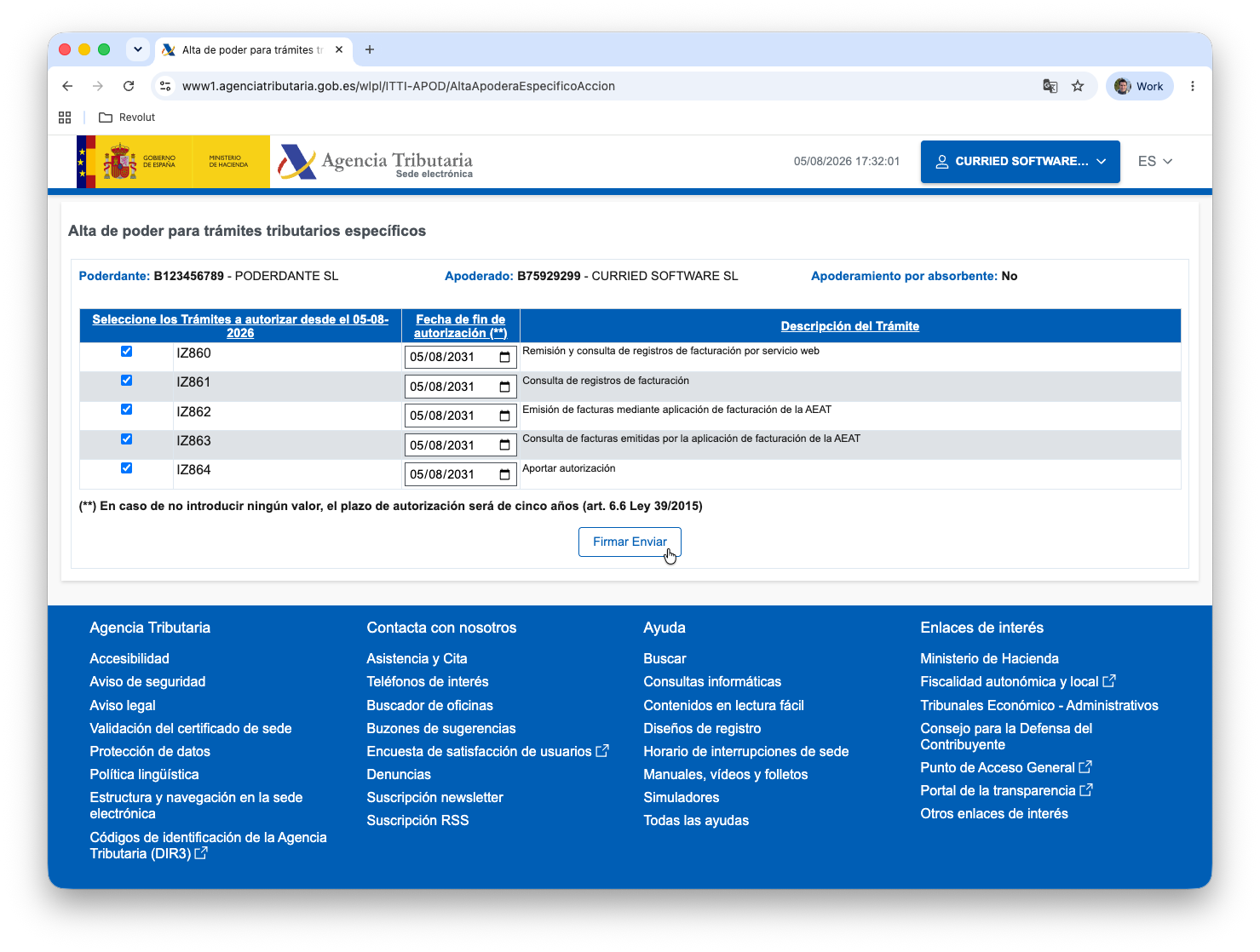
They show the AEAT site, not uninvoice.app, so they are in Spanish and look the way the site looked when this guide was written. Each label is quoted as it appears on screen, with its meaning in English next to it. The grantor (Poderdante) in them is a placeholder: yours will show your own NIF and name.
2.1 Open the apoderamiento procedure
Go to Apoderamiento para la realización de trámites y actuaciones en materia tributaria por Internet (power of attorney for tax procedures over the internet) at the AEAT Sede Electrónica, and under Gestiones click Alta de poder mediante identificación electrónica ("register a power using electronic identification").
2.2 Identify yourself
Pick how you sign in: Cl@ve Móvil, Certificado o DNI electrónico (an electronic certificate or electronic ID card), or EU eIDAS access.
Sign in as the taxpayer that issues the invoices, since that is who grants the power. For a company, that means the company's own certificate, or the certificate of someone already empowered to act for it.
2.3 Choose a power for specific procedures
The AEAT asks whether you are granting a general power over tax procedures or a power over specific ones. Click Alta de poder para trámites tributarios específicos ("register a power for specific tax procedures"): a general power also works, but the specific one grants only what invoice reporting needs and nothing else.
2.4 Switch the procedure picker to tree view, then fill in the form
Do the switch first, before typing anything: the picker starts in list view, which asks you to search by name or procedure code, and changing it reloads the form and clears everything already entered. Click Visualizar los trámites en modo árbol ("view the procedures as a tree"), which is the shorter route to the procedure you need.
With the tree showing, fill in the form:
- NIF del Apoderado (the representative's tax id): type
B75929299. This is the only value you have to know by heart. - Fecha fin de la autorización (end date): optional. Left empty, the power lasts five years (art. 6.6 of Law 39/2015).
- Apoderamiento por absorbente: leave it on No unless you are granting it as the absorbing company of a merger.
- Poderdante (the grantor) is filled in by the AEAT from the identity you signed in with. Check that it is the issuing taxpayer.
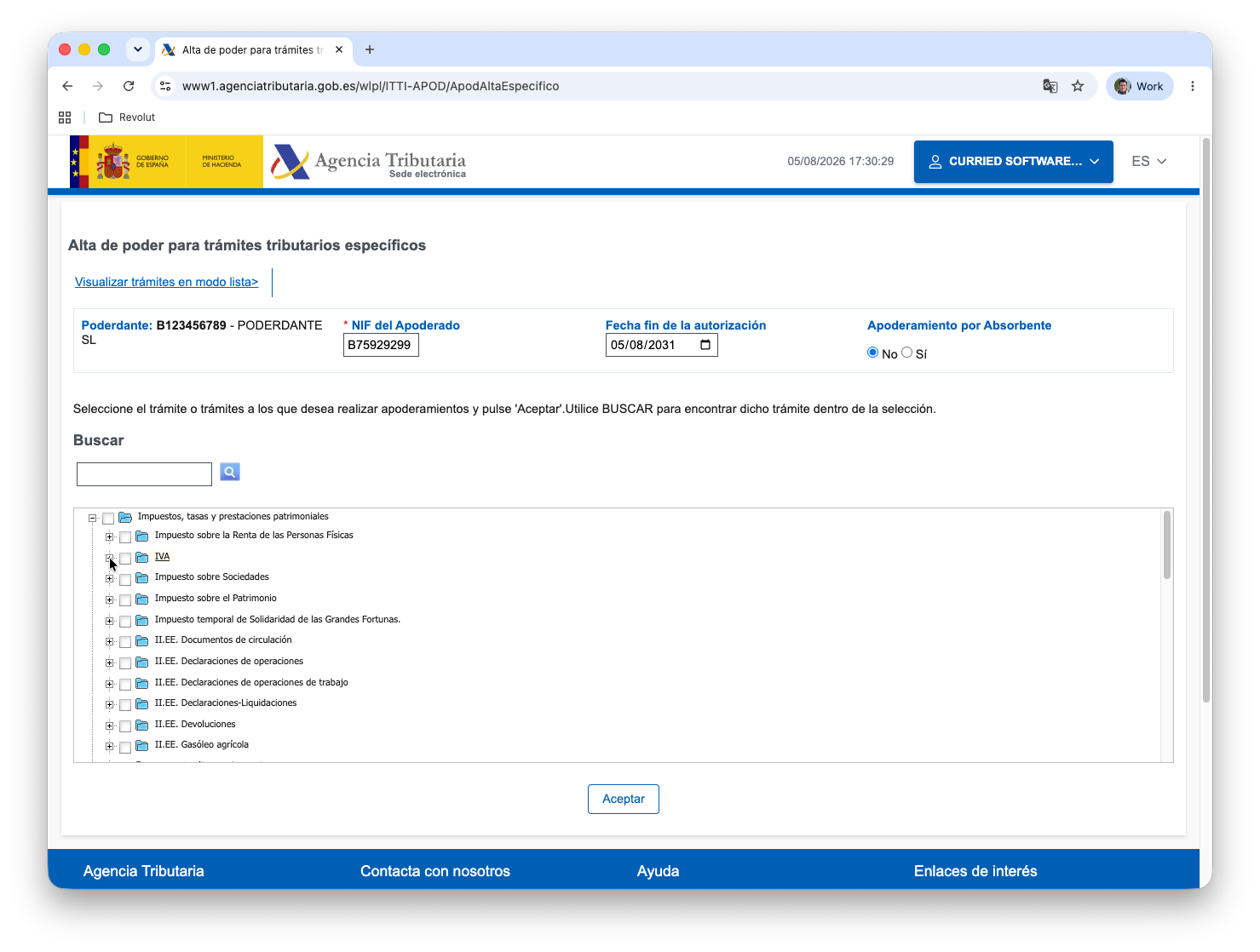
2.5 Open Impuestos, tasas y prestaciones patrimoniales, then IVA
The tree groups every procedure the AEAT can delegate. Expand Impuestos, tasas y prestaciones patrimoniales (taxes, fees and public charges), the first entry.
Inside it, expand IVA (VAT). Invoice reporting lives under VAT, not under corporate income tax, whatever tax your business pays.
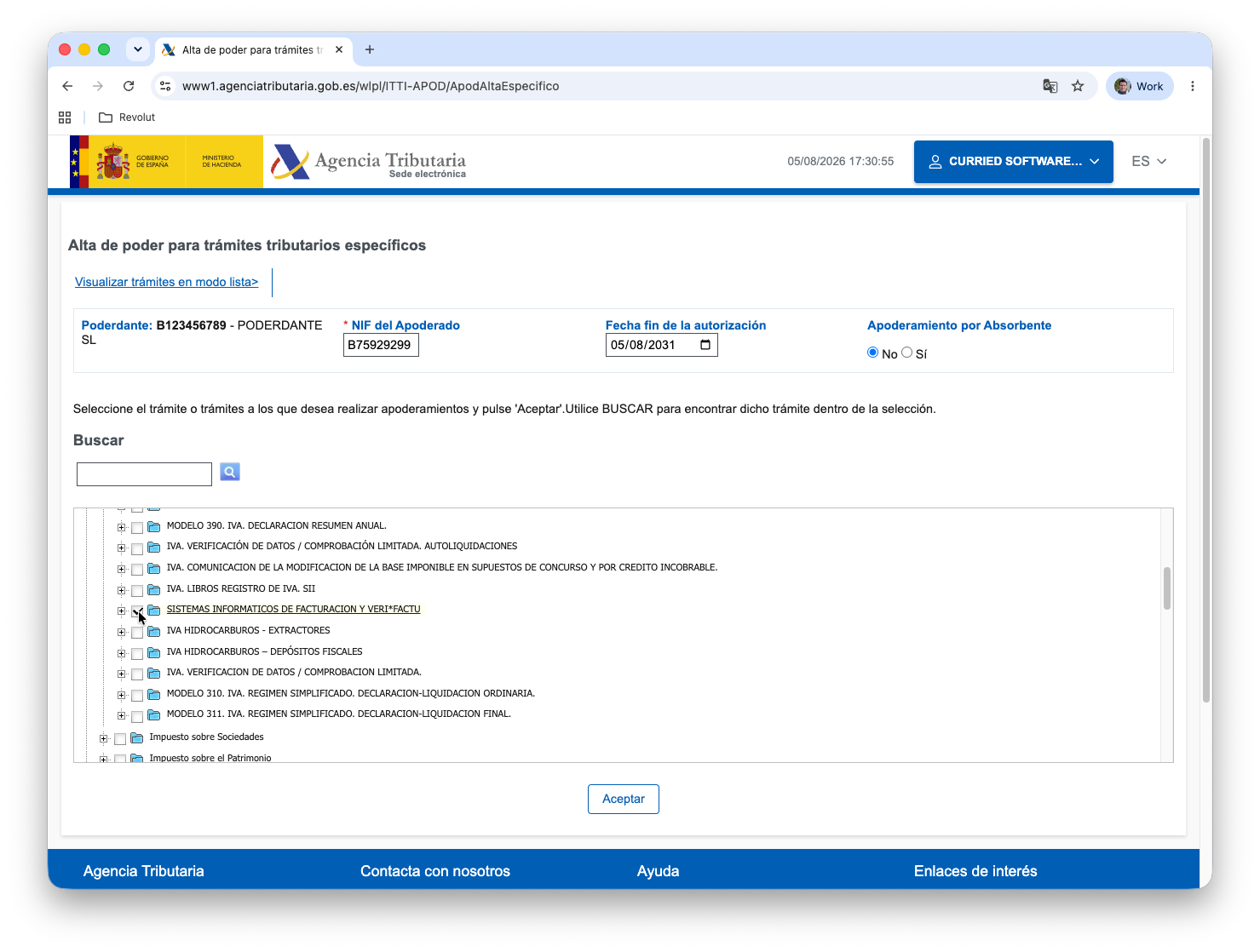
2.6 Tick Sistemas informáticos de facturación y Veri*Factu
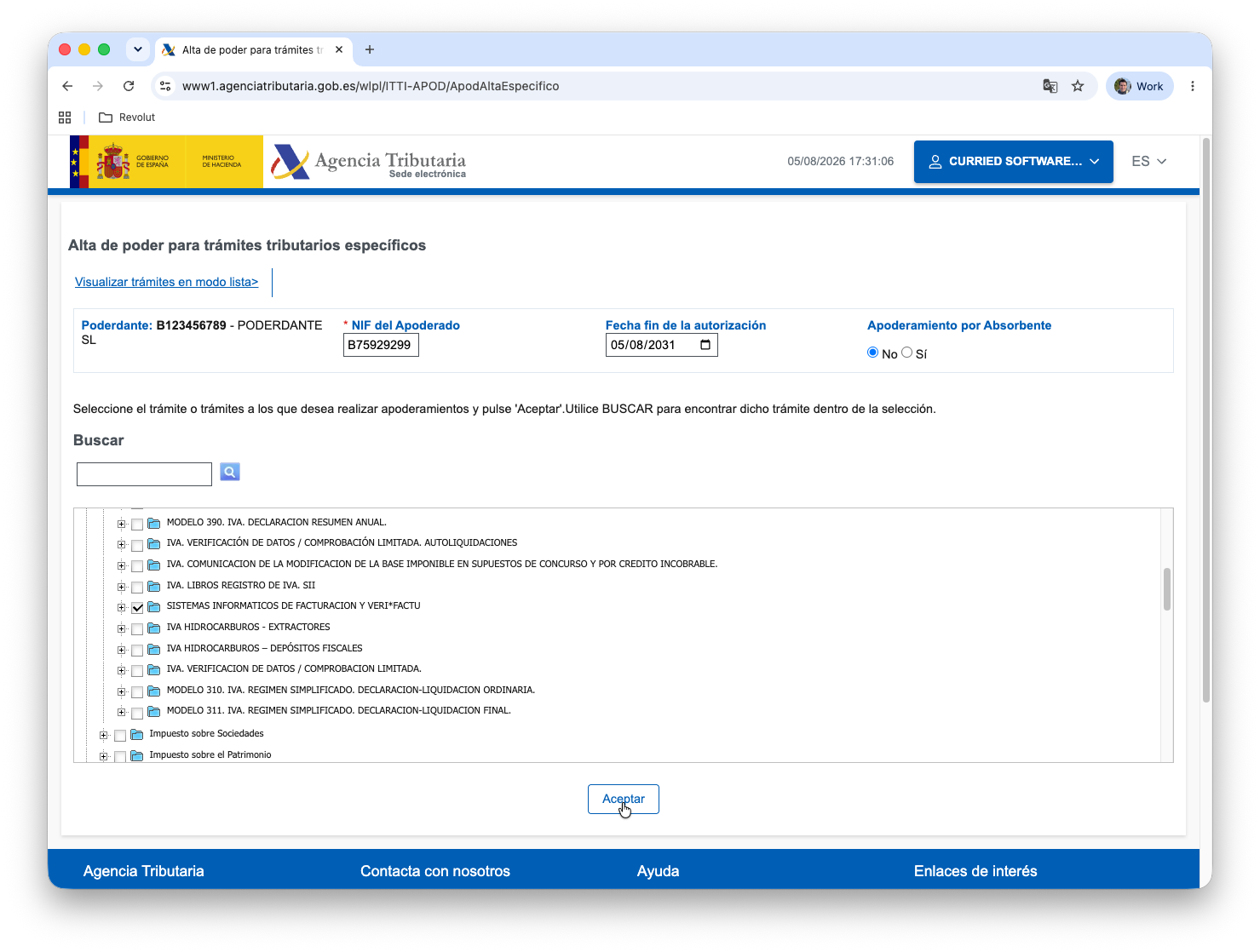
Scroll the VAT group down to SISTEMAS INFORMATICOS DE FACTURACION Y VERI*FACTU ("invoicing software systems and Veri*Factu") and tick its checkbox. Tick the group itself: it stands for all the procedures inside it, so there is no need to expand it and pick them one by one.
With the box ticked, press Aceptar ("accept").
2.7 Review the procedures and sign
The AEAT expands the group into the five procedures it covers and shows them for confirmation, each with its own end date:
| Code | What it covers |
|---|---|
| IZ860 | Submitting and querying billing records through the web service |
| IZ861 | Querying billing records |
| IZ862 | Issuing invoices with the AEAT's own invoicing application |
| IZ863 | Querying invoices issued with the AEAT's application |
| IZ864 | Providing an authorization |
Granting all five is what ticking the group does, and it is what this guide is tested against. If you would rather narrow it, the one uninvoice.app uses is IZ860: it is how records are submitted, and how the daily check asks the AEAT whether the power is still in place. IZ862 and IZ863 cover the AEAT's own invoicing application and have nothing to do with uninvoice.app.
Check that the Apoderado reads B75929299 - CURRIED SOFTWARE SL, then press
Firmar Enviar ("sign and send") and sign with your certificate or Cl@ve. The
AEAT confirms the registration on screen, and the power is in effect from that
moment.
3. Confirm it in uninvoice.app
Open Company → VeriFactu authorization and click "I've granted the power". The status changes to Pending verification, not straight to authorized.

The button only records that you completed the AEAT step. It is not the authorization itself, and it does not lift the issuance gate on its own: your word is not evidence, and the real authorization is the power registered at the AEAT.
What lifts the gate is the AEAT agreeing that we may act for your NIF. uninvoice.app asks it once a day, so confirmation can take up to a day. When the AEAT confirms the power, the status becomes Authorized, we email you, and you can issue invoices. Until then, issuance stays blocked.
4. Keep issuing
From then on, each invoice you issue generates a hash-chained record, includes the QR code and VERI*FACTU marking on the PDF, and is submitted to the AEAT automatically. You do not need to take action per invoice. You can check each submission status from within the app.
Until you authorize us
For a Spanish (in-scope) issuer that has not authorized us yet, uninvoice.app blocks issuance: the invoice stays a draft, no invoice number is assigned, and nothing is ever sent to the AEAT outside VERI*FACTU. The same applies while an authorization is still on its way: a power reading Pending verification, or a signed document we are still checking. You can issue normally once the status reads Authorized.
Two actions wait for it, and they are really the same one: issuing an invoice and promoting a proforma into an invoice. Everything else keeps working, so you can prepare now and issue the moment the authorization takes effect:
- writing and editing drafts, and downloading them as watermarked previews
- creating, editing and sending proformas
- customers and suppliers, expenses and receipts, bank accounts, templates
- reports, the HTTP API and agent access over MCP
Nothing about this depends on your plan: the authorization is compliance, and compliance is on every tier.
If the power is revoked at the AEAT
This applies to the alternative route only. uninvoice.app asks the AEAT once a day whether the power is still in place. If the AEAT says it is missing or no longer valid, uninvoice.app marks your authorization Revoked by the AEAT and blocks issuance again. To resume, grant the power again at the AEAT and confirm once more on the authorization page, which returns the status to Pending verification until the next daily check confirms it.
An authorization document does not go through this check, because it is not registered at the AEAT: it stays in effect until it is withdrawn.
What stays your responsibility
- The accuracy of the invoice data you enter remains yours as the taxpayer.
- Keep your authorization current: if you stop using uninvoice.app, revoke the apoderamiento at the AEAT, or write to us to withdraw the signed authorization.