AI Audit
uninvoice.app is driven by people (the web app, over a browser session) and by AIs (an AI agent using the MCP server, or the HTTP API with an API token). Because invoices carry legal weight, uninvoice.app never lets an AI change your data on its own: every mutating action an AI requests is intercepted before it takes effect, recorded for review, and held until a person approves or rejects it.
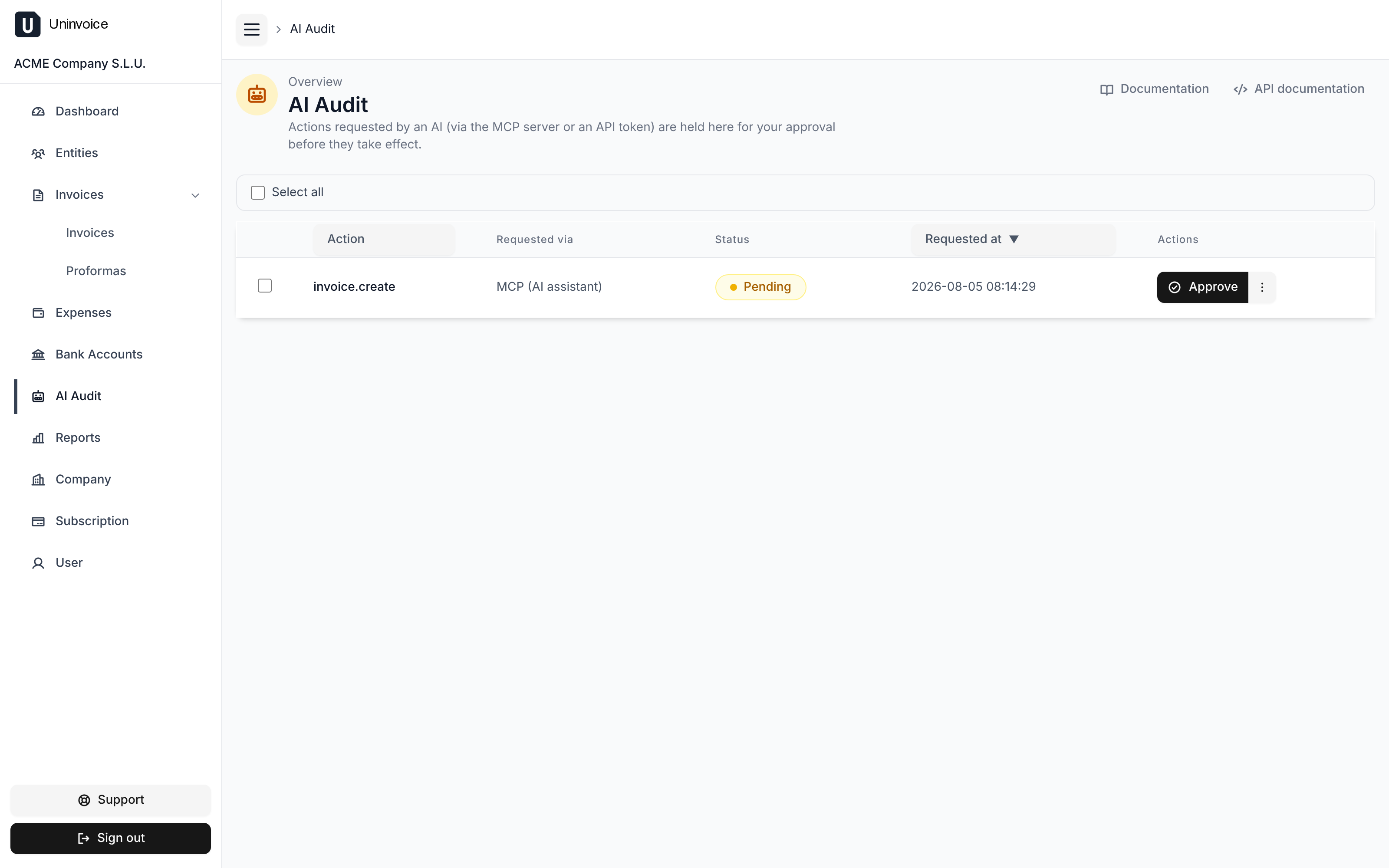
This gate is called AI Audit. You review the queue on the AI Audit page in the web app.
What happens to an AI's request
- An AI caller sends a mutating request (create an invoice, issue it, create an expense, delete a proforma, …).
- Instead of running, the request is recorded as a pending AI Audit entry
that captures who asked, the action, and the exact payload. The API responds
202 Acceptedand the action does not run. - A human opens the AI Audit queue and either:
- approves it: the original request is replayed exactly as captured and finally takes effect, or
- rejects it: nothing runs, and the entry is closed.
Reads (GET) are never gated: only POST, PUT, PATCH, and DELETE.
Who counts as an AI
Whether a request is gated depends on who is driving it, not on the endpoint:
| Caller | Treated as | Gated? |
|---|---|---|
| Web app (browser session) | Human | No, runs immediately |
API token without a valid X-Human-Proof header | AI | Yes, mutations are held for approval |
API token with a valid X-Human-Proof header | Human | No, runs immediately |
| MCP server | AI | Yes, always: write tools are held for approval |
So the same API token can act as a human or as an AI on a per-request basis,
depending on whether it presents the X-Human-Proof header (see
Letting a token act as a human below). The
MCP server is always treated as an AI and cannot opt out.
The 202 pending_approval response
When a mutating AI request is captured, the API returns 202 Accepted with
a JSON body instead of the normal result. The handler never runs:
{
  "status": "pending_approval",
  "auditId": "a1b2c3d4-5e6f-4a7b-8c9d-ef0123456789",
  "action": "invoice.create",
  "message": "This action was recorded for human review and has NOT been applied. A person must approve it in the uninvoice.app audit log before it takes effect."
}
Your integration should treat 202 pending_approval as "not done yet": keep the
auditId, and poll the entry (or watch the AI Audit page) until it becomes
approved (with a resourceId) or rejected.
action is a stable logical label for the captured request, for example
invoice.create, invoice.issue, invoice.correct, proforma.create,
proforma.promote, expense.create, entity.create, entity.update,
company.update, or apiToken.create.
Reviewing the queue
These endpoints surface the queue and let a human resolve entries. They are the
only endpoints that are never gated, and they can only be driven by a human
(a web session, or an API token presenting a valid X-Human-Proof; see below).
An AI caller cannot approve its own requests.
| Method | Path | Description |
|---|---|---|
GET | /v1/ai-audit | List captured entries. Filter with ?status=pending|approved|rejected|failed. |
GET | /v1/ai-audit/{id} | Fetch a single entry. |
POST | /v1/ai-audit/{id}/approve | Approve and replay the captured request. |
POST | /v1/ai-audit/{id}/reject | Reject the entry; nothing runs. |
An entry has a status of pending, approved, rejected, or failed (an
approved action whose replay hit a business error, e.g. a Veri*Factu
authorization requirement). On success, resourceId points at the resource the
replay created or affected.
Approve an entry
curl -X POST https://api.uninvoice.app/v1/ai-audit/<audit-id>/approve \
  -H "Authorization: Bearer <token>" \
  -H "X-Human-Proof: <human-proof>"
Letting a token act as a human
Not every automation should go through the review queue. A supervised script, a back-office job, or a human running a CLI is already "a person driving": it should run immediately. To assert that, present the token's human proof.
When you create a token, you choose its kind. A standard API key is created with a companion secret, its human proof, returned once at creation. (An MCP API key is AI-driven by design: it is created without a human proof (none is ever stored), so it can never opt out and every mutation it makes is always gated. Pick a standard key if you need to present human proof.)
The human proof is returned once, at creation:
{
  "id": "9b1f7c2a-3d4e-4f5a-8b6c-1d2e3f4a5b6c",
  "humanProof": "7c4a8d09-1e2f-4b3c-9a8d-0f1e2d3c4b5a",
  "createdAt": "2026-07-14T10:00:00Z"
}
Store humanProof alongside the token: like the token, it is shown only at
creation and never again. Then, on any request you want to run without
audit, add it as a header:
Authorization: Bearer <api-token>
X-Human-Proof: <human-proof>
With a matching X-Human-Proof, the request is treated as human-driven: it
executes immediately and is never audited. Presenting it also lets the token
review the queue (approve/reject) via the API. Omit it (or send the
wrong value) and the token is treated as an AI again, so its mutations are held
for approval.
To create a token programmatically, POST /v1/companies/current/api-tokens with
{"mcp": true} for an AI-driven MCP key (no human proof), or omit mcp (or send
false) for a standard key that returns a humanProof.
Presenting a valid X-Human-Proof effectively skips the AI Audit gate for
that request. Only attach it to automations a person genuinely supervises, and
guard it as carefully as the token itself. Tokens created before AI Audit
existed have no human proof and are therefore always treated as AIs, so create
a new token if you need one that can present human proof.